The Edit Tab See all your Google Business Profile information in one place — and learn which settings you can update directly inside LocalOptics.
What Is the Edit Tab?
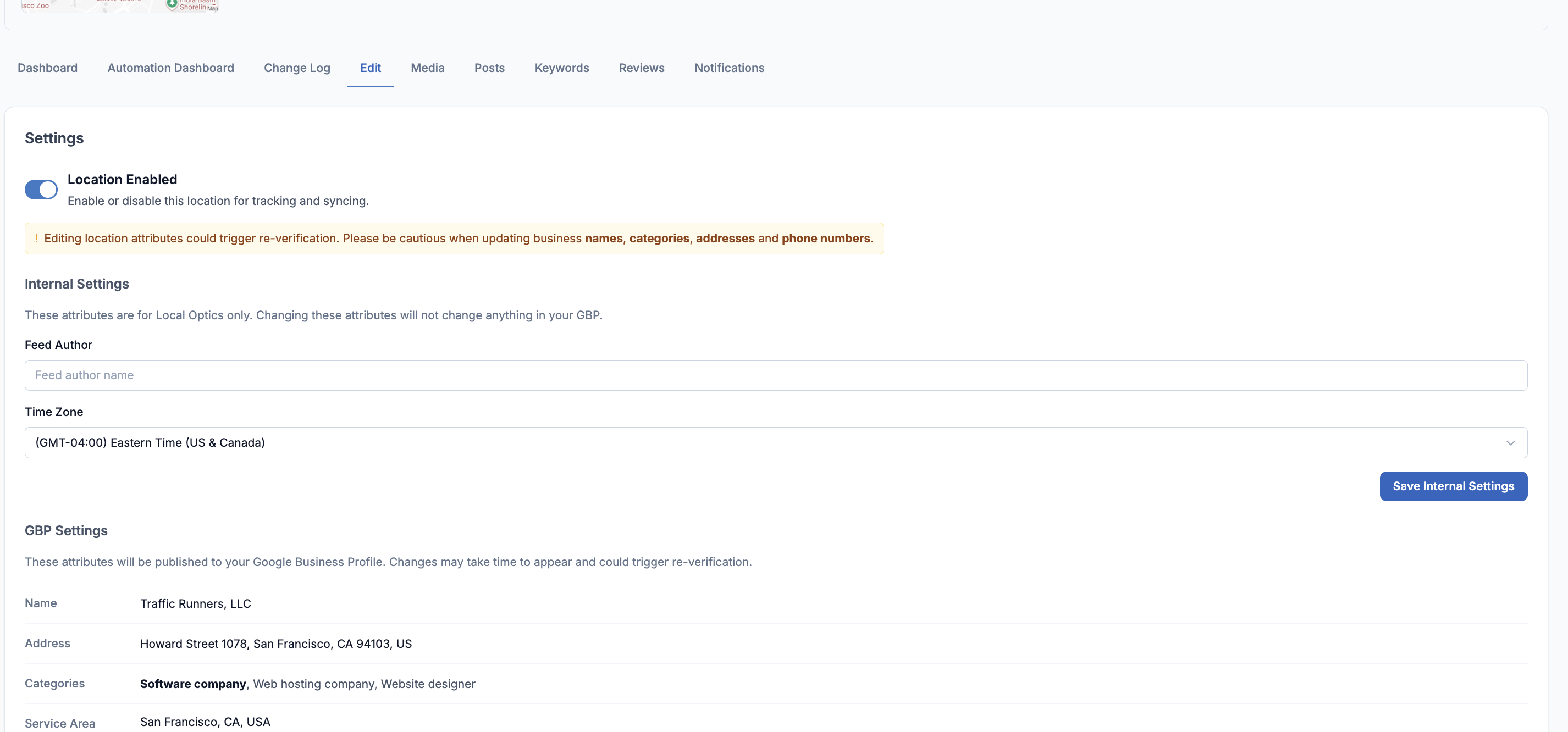
The Edit tab gives you a full view of your location's settings — both internal LocalOptics settings and your live Google Business Profile (GBP) information.
It is split into two sections:
- Internal Settings — settings that only exist inside LocalOptics
- GBP Settings — a read-only mirror of what is currently live on your Google Business Profile
Important: Most fields on the Edit tab are for viewing only. Changes to your Google Business Profile — like your name, address, hours, or description — must be made directly in Google Business Profile Manager, not in LocalOptics.
Section 1 — Internal Settings
Internal Settings are LocalOptics-only settings. Changing these will not affect anything on your live Google Business Profile.
✏ Editable Feed Author The name that appears as the author on your location's content feed inside LocalOptics. This is an internal label only — it has no effect on your Google profile.
✏ Editable Time Zone The time zone LocalOptics uses for scheduling and reporting for this location. Set this to match the location's local time zone for accurate data. This does not update the time zone shown on Google.
Location Enabled toggle At the top of the Internal Settings section, you'll see a Location Enabled toggle. This controls whether LocalOptics is actively tracking and syncing this location. If it's switched on, the location is active. If you switch it off, LocalOptics will pause tracking for that location.
💡 To save changes: After updating the Feed Author or Time Zone, click the Save Internal Settings button in the bottom right corner of the page.
Section 2 — GBP Settings (View Only)
The GBP Settings section shows a live snapshot of everything currently published on your Google Business Profile. This is a read-only view — you cannot edit these fields inside LocalOptics.
To make changes to any of these fields, you need to go directly to your Google Business Profile Manager.
| Field | What it shows | Status |
|---|---|---|
| Name | Your official business name as it appears on Google | 👁 View only |
| Address | The full street address of the location | 👁 View only |
| Categories | Your primary category (bold) and any additional categories | 👁 View only |
| Service Area | The geographic area your business serves | 👁 View only |
| Regular Hours | Your weekly opening and closing times for each day | 👁 View only |
| Special Hours | Holiday or one-off hours set on your Google profile | 👁 View only |
| Phone | The main phone number listed on your profile | 👁 View only |
| Website | The website URL linked to your Google profile | 👁 View only |
| Description | Your business description as published on Google | 👁 View only |
| Labels | Internal Google labels, if any are applied | 👁 View only |
| Opening Date | The official opening date of the business | 👁 View only |
| Media | The total number of photos and videos on the profile | 👁 View only |
⚠️ Re-verification warning: Editing certain fields in Google Business Profile — especially your business name, categories, address, and phone number — can trigger a re-verification process. Google may ask you to verify your business again before the changes go live. Always be cautious when updating these fields.