What Is a GBP Audit Report?
A GBP Audit Report is a comprehensive analysis of your Google Business Profile compared against your local competitors. It examines every major component of your listing — from how you rank on Google Maps to your categories, reviews, photos, posts, and even your website speed.
The audit is designed to give you a clear, honest picture of where your business is strong, where competitors are outperforming you, and exactly what you can do to close the gap.
💡 Good to know: Audits are run automatically and saved to your Automation Dashboard. Every time a new audit runs, it captures a fresh snapshot — so you can track improvements over time.
Section 1 — GeoGrid: Your Local Rankings
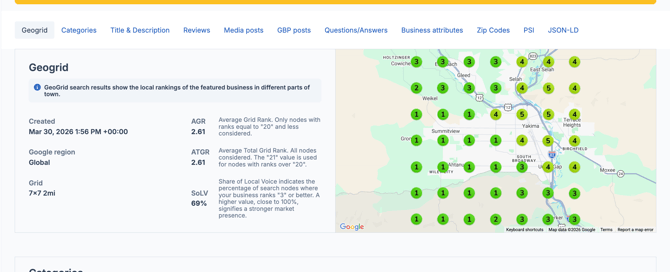
The first section of the audit shows a GeoGrid map of your business rankings across your geographic area. Each node on the grid shows your position in Google Maps search results at that location.
Below the map you'll see your three core scores:
| Metric | What it means |
|---|---|
| AGR | Average Grid Rank — your average ranking across nodes where you appear in the top 20 |
| ATGR | Average Total Grid Rank — your average including all nodes, with 20+ counting as 21 |
| SoLV | Share of Local Voice — the % of nodes where you rank in the top 3 |
Section 2 — Categories
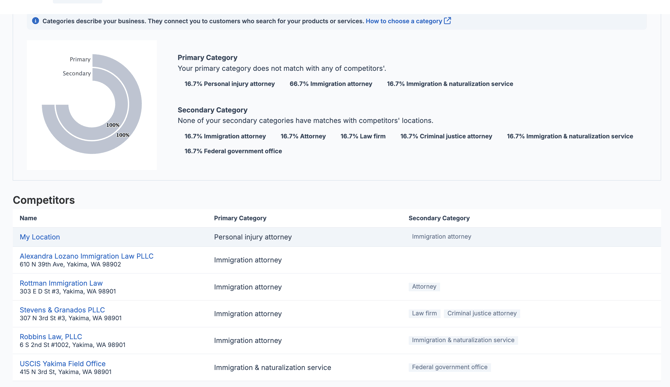
This section compares your primary and secondary Google Business Profile categories against those of your competitors.
You'll see a breakdown showing how many competitors use each category — displayed as a percentage. This helps you quickly spot:
- Whether your primary category matches what competitors are using
- Which secondary categories competitors have that you may be missing
- Category opportunities that could improve how Google classifies your business
⚠️ Keep in mind: If your primary category doesn't match any of your competitors', it may signal a misalignment that could be affecting your visibility for the most searched terms in your area.
Section 3 — Competitors
This section lists your main local competitors with their business name, address, primary category, and secondary categories side by side. Use this to understand who you're competing against and how they've categorized their businesses.
Section 4 — Title & Description
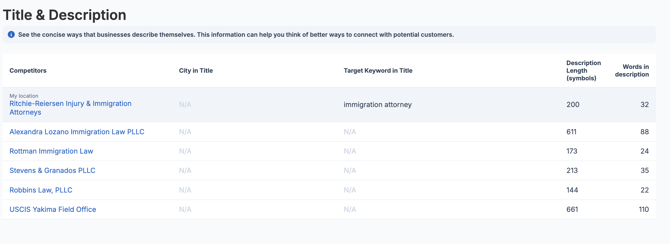
This section compares how you and your competitors describe their businesses, including:
| Data point | What it reveals |
|---|---|
| City in title | Whether competitors include the city name in their business name |
| Target keyword in title | Whether the primary keyword appears in the business name |
| Description length | How many characters competitors use in their description |
| Words in description | How many words competitors use |
A longer, keyword-rich description gives Google more signals about what your business offers. If competitors are using significantly more words or including keywords you're not, this section shows you exactly where to focus.
Section 5 — Reviews & Ratings
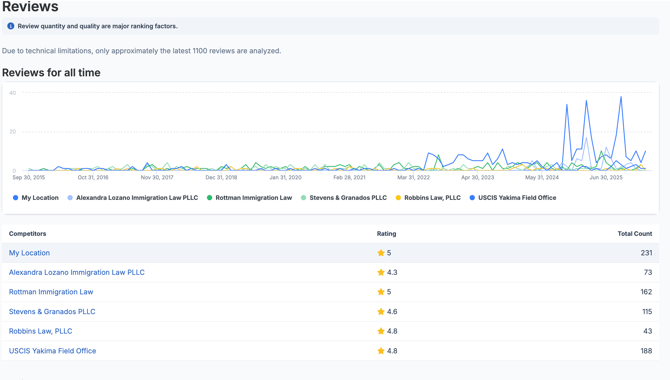
The reviews section gives you a full competitive breakdown of reputation performance, including:
All-time review data:
- Total review count for your business and each competitor
- Average star rating
- Response rate — what percentage of reviews have been replied to
- Last review date
- Review velocity — how many new reviews are being received per day over the last 180, 90, and 30 days
Past 180 days breakdown:
- How many reviews each competitor received in the last 6 months
- The percentage breakdown by star rating (5-star, 4-star, 3-star, 2-star, 1-star)
💡 Why this matters: Review velocity is one of the most important signals here. A business receiving 0.33 new reviews per day is growing its reputation much faster than a competitor receiving 0.01. Consistent review generation is a significant local ranking factor.
Section 6 — Media Posts
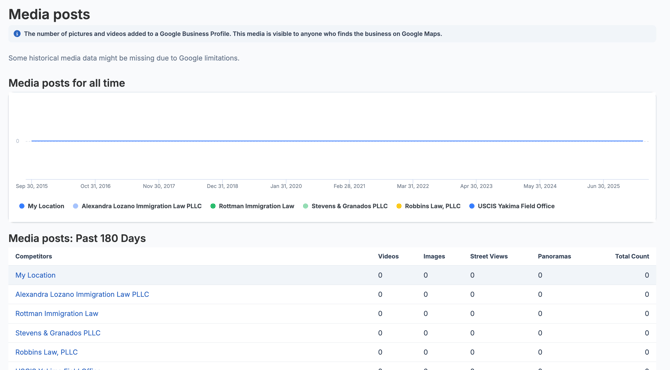
This section shows the number of photos and videos each business has added to their Google Business Profile — broken down by type: images, videos, street views, and panoramas.
You'll see both all-time media history and a past 180-day comparison. If competitors have significantly more photos than your business, adding more high-quality images is one of the quickest ways to close the gap.
Section 7 — Posts
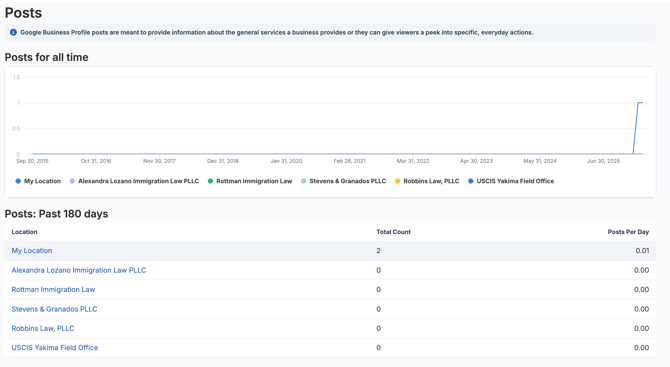
This section compares how frequently you and your competitors are publishing Google Business Profile posts, including:
- Total post count over the last 180 days
- Posts per day
- Breakdown by post type — Standard, Event, and Offer
Regular posting signals to Google that your business is active and engaged. If you're the only business in your area publishing posts, this is a meaningful competitive advantage.
Section 8 — Questions & Answers
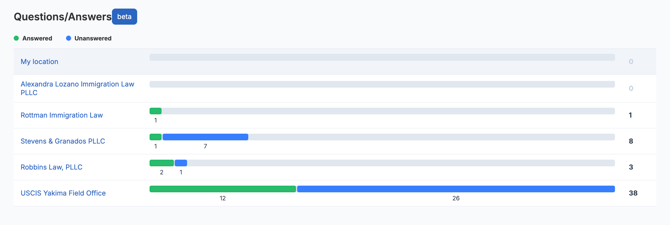
This section shows how many answered and unanswered questions each competitor has on their Google Business Profile. A high number of unanswered questions — especially on competitor profiles — represents an opportunity to differentiate by keeping your own Q&A fully answered.
Section 9 — Business Attributes
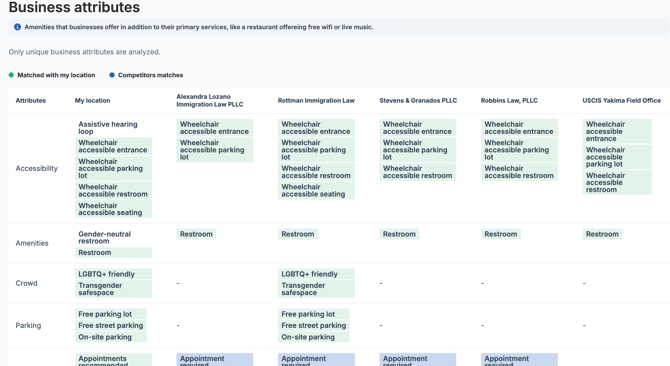
Attributes are the amenities and features your business offers — things like wheelchair accessible entrance, free parking, appointment required, language assistance, and LGBTQ+ friendly status.
This section compares your attributes against competitors to highlight:
- Attributes you have that competitors don't
- Attributes competitors have that you're missing
- Opportunities to add attributes that may influence customer decisions
Section 10 — Competitor Zip Codes
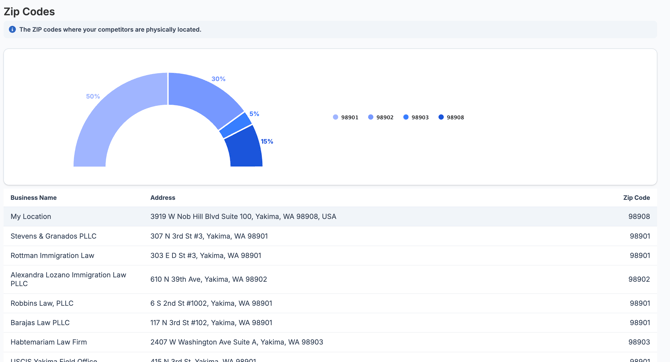
A map and table showing the zip codes where your competitors are physically located. This gives you a geographic overview of the competitive landscape in your area.
Section 11 — Page Speed Insights
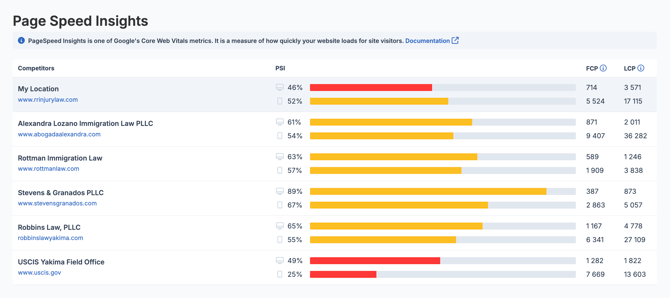
This section shows how quickly your website loads compared to competitors, using Google's Core Web Vitals metrics:
| Metric | What it measures |
|---|---|
| PSI (Page Speed Index) | Overall page speed score — higher is better |
| FCP (First Contentful Paint) | How quickly the first content appears on screen — lower is better |
| LCP (Largest Contentful Paint) | How quickly the main content loads — lower is better |
Section 12 — JSON-LD
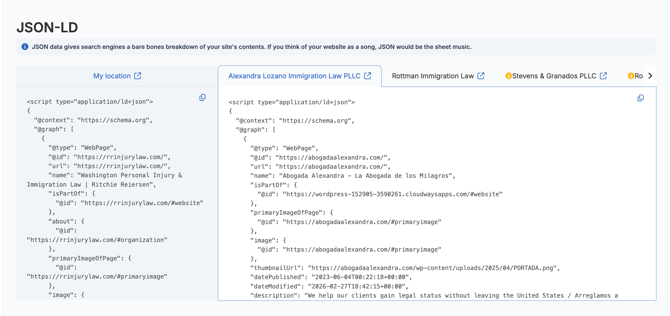
JSON-LD (JavaScript Object Notation for Linked Data) is structured data code embedded in your website that gives search engines a clear, machine-readable breakdown of your business information. If you think of your website as a song, JSON-LD is the sheet music — it tells Google exactly what your business is, what it does, and how it's structured, without Google having to interpret it from your page content.
This section of the audit crawls your website and your competitors' websites, extracts the JSON-LD code from each, and displays them side by side so you can compare directly.
Need Help?
If you have questions about your audit results or want guidance on how to act on the findings, reach out to the LocalOptics support team through the platform.