
What Is the Reviews Tab?
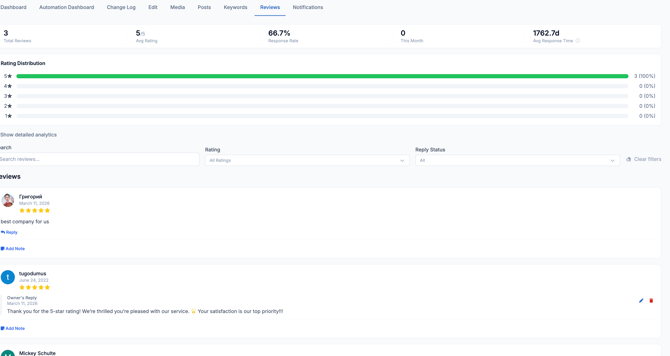
The Reviews tab shows you all the customer reviews left on your Google Business Profile for a single location. From here you can read every review, reply directly, add internal notes, and track your overall rating performance.
It also includes a powerful Detailed Analytics section that shows trends, volume, and even lets you simulate what would happen to your rating if you received more reviews.
💡 Good to know: Responding to reviews — both positive and negative — shows customers and Google that you're an active, engaged business. It can have a positive effect on your local search ranking.
Detailed Analytics
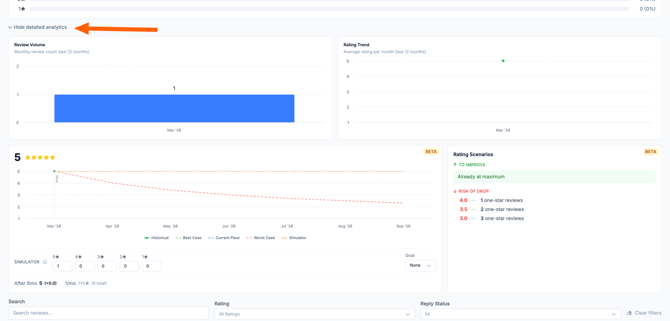
Click Show detailed analytics below the rating distribution chart to expand the full analytics panel. This section has four parts:
1. Review Volume A bar chart showing how many reviews you received each month over the last 12 months. Use this to spot patterns — for example, whether reviews spike after busy seasons or marketing campaigns.
2. Rating Trend A line chart showing your average star rating per month over the last 12 months. This helps you see whether your rating is improving, holding steady, or declining over time.
3. Rating Scenarios (Beta) The Rating Scenarios lets you model future scenarios. Enter how many 1-star through 5-star reviews you expect to receive, and the simulator will show you what your rating would look like after 6 months based on different trajectories