What Is Call Tracking?
Call Tracking is a built-in feature in LocalOptics that gives you full visibility into the phone call activity happening across your business locations. Instead of guessing how many calls your Google Business Profile is generating, Call Tracking captures the data automatically and presents it in one organized dashboard.
It's especially useful for agencies and businesses managing multiple locations — you can see call performance across all locations, identify which numbers are performing, block unwanted callers, and connect your existing phone system directly to LocalOptics.
💡 Good to know: Call Tracking works by assigning trackable phone numbers to your locations. When a customer calls that number, the call is logged and the data is captured — giving you a clear picture of call volume, timing, and engagement without any manual work.
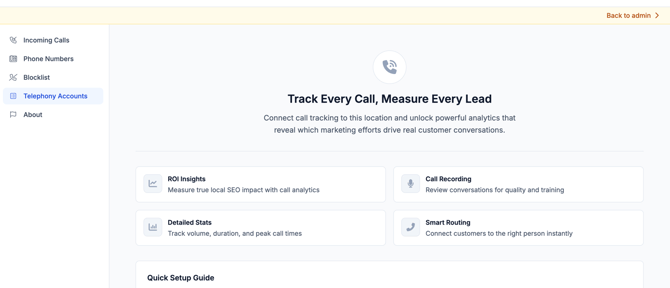
The Four Sections of Call Tracking
The Call Tracking system is organized into four sections. Here's what each one does:
1. Incoming Calls
The Incoming Calls section is your call log and analytics hub. It shows a full record of every call received across your tracked numbers, including:
- Caller number and call date and time
- Call duration
- Whether the call was answered or missed
- Which tracked number and location the call came through
Use this section to review call activity, identify patterns in call volume, and spot missed call opportunities that may need follow-up.
💡 Tip: Monitoring missed calls is just as important as tracking answered ones. A spike in missed calls could signal that a location is understaffed during peak hours or that a number needs to be redirected.
2. Phone Numbers
The Phone Numbers section is where you purchase, configure, and assign trackable phone numbers to your locations.
From here you can:
- Purchase new tracking numbers directly inside LocalOptics
- Assign numbers to specific locations
- Configure call forwarding so calls to the tracking number ring through to the actual business line
- View which numbers are active and which locations they're assigned to
Each tracking number acts as a layer between the customer and the business — capturing call data before forwarding the call to the real phone number, so nothing is missed and everything is logged.
⚠️ Important: Always configure call forwarding correctly when setting up a new number. If forwarding isn't set up, calls to the tracking number won't reach the business.
3. Blocklist
The Blocklist section lets you prevent specific phone numbers from calling your tracked lines. Any number added to the blocklist will be automatically blocked from reaching your business through your LocalOptics tracking numbers.
Use the blocklist for:
- Spam callers or robocall numbers
- Repeated nuisance callers
- Numbers you've identified as fraudulent or irrelevant
💡 Tip: If you notice a number repeatedly appearing in your Incoming Calls log without any legitimate business purpose, add it to the blocklist to stop it from consuming your call tracking data and skewing your analytics.
4. Telephony Accounts
The Telephony Accounts section is where you connect LocalOptics to an external telephony provider — such as Twilio or SignalWire. This allows LocalOptics to sync with your existing phone infrastructure rather than requiring you to manage everything from scratch inside the platform.
Once connected, your telephony account powers the phone numbers and call routing inside LocalOptics — giving you the flexibility to use your existing provider while benefiting from LocalOptics' call tracking and analytics layer on top.
This section is most relevant for:
- Agencies or businesses that already use Twilio or SignalWire
- Users who want to bring their own number inventory
- Advanced setups requiring custom call routing or IVR configurations
In the Telephony Accounts section, you can link your Twilio or SignalWire account to sync existing phone numbers into the system and purchase new ones.
Setup requirements:
-
Twilio: Account SID + Token
-
SignalWire: Project ID + Token + Space URL + Signing Key
Once connected, synced numbers will appear in the Phone Numbers tab and can be managed like any number purchased directly through the UI.
If you have questions about setting up a tracking number, connecting a telephony account, or configuring call forwarding, reach out to the LocalOptics support team through the platform.